<?xml version="1.0" encoding="utf-8"?>
<feed xmlns="http://www.w3.org/2005/Atom">
    <title>Walton's Blog</title>
    <link href="https://waltonhoops.com/atom.xml" rel="self" />
    <link href="https://waltonhoops.com" />
    <id>https://waltonhoops.com/atom.xml</id>
    <author>
        <name>Walton Hoops</name>
        <email>me@waltonhoops.com</email>
    </author>
    <updated>2014-02-27T00:00:00Z</updated>
    <entry>
    <title>Practicing with Project Euler</title>
    <link href="https://waltonhoops.com/blog/2014/02/27/practicing-with-project-euler/" />
    <id>https://waltonhoops.com/blog/2014/02/27/practicing-with-project-euler/</id>
    <published>2014-02-27T00:00:00Z</published>
    <updated>2014-02-27T00:00:00Z</updated>
    <summary type="html"><![CDATA[<div class="figure">
<img src="http://projecteuler.net/profile/walton.hoops.png" alt="My Project Euler Badge" />
<p class="caption">My Project Euler Badge</p>
</div>
<p>I’ve recently solved my 25th <a href="http://projecteuler.net/">Project Euler</a> problem, progressing to level 1!</p>
<p>For those who might not know, Project Euler is a site which provides a large collection of problems designed to be solved with a program. Many of the top problem solvers list pencil and paper as their programming language, however. Euler problems are designed to be solvable in less than a minute. While many can be solved by brute force, most will need a more well-thought out approach to solve them within a reasonable time frame.</p>
<p>Project Euler has been on my radar for awhile now, but I’ve only recently started working on it. It’s proving a great way to practice and learn new languages. I’ve primarily been solving problems with Haskell, but I also have several solutions in Common Lisp and Racket. Haskell seems especially well-suited for many of the puzzles on Euler. Dealing with infinite streams is a common theme and Haskell’s lazy evaluation shines there. It’s not uncommon to set up the problem in the most obvious way, then let laziness ensure that you don’t do any more work than necessary. Though I’d love to give an example of this, Project Euler discourages sharing solutions online so as not to spoil anyone’s “Ah Ha!” moment.</p>
<p>If you’re looking for a way to practice your skills or learn new languages, I highly recommend giving <a href="http://projecteuler.net">Project Euler</a> a look. Or if you want something a bit less mathy, check out <a href="http://www.codewars.com/">Code Wars</a>. Unlike Project Euler, it’s not language agnostic: they currently support Ruby, JavaScript and CoffeeScript. Support is also on the way for Python, Haskell, C# and Java. Unlike Euler, Code Wars also has a big focus on TDD which might be a plus for some people.</p>]]></summary>
</entry>
<entry>
    <title>My .stumpwmrc</title>
    <link href="https://waltonhoops.com/blog/2013/02/10/my-stumpwmrc/" />
    <id>https://waltonhoops.com/blog/2013/02/10/my-stumpwmrc/</id>
    <published>2013-02-10T00:00:00Z</published>
    <updated>2013-02-10T00:00:00Z</updated>
    <summary type="html"><![CDATA[<p>In my efforts to learn Lisp, I started using <a href="http://www.nongnu.org/stumpwm/">StumpWM</a>. Using a window manager configurable in Common Lisp seemed like a good way to practice, and as it turns out, I fell in love. It uses keybindings and acts similar to <a href="http://www.gnu.org/software/emacs/">Emacs</a> or <a href="http://tmux.sourceforge.net/">Tmux</a>, which for me at least makes it much nicer to work with than <a href="http://xmonad.org/">xmonad</a> or <a href="http://awesome.naquadah.org/">awesome</a>.</p>
<p>Coming up with a configuration that worked for me took some effort, so I thought I’d share what I came up with. Here it is:</p>
<div class="sourceCode"><pre class="sourceCode commonlisp"><code class="sourceCode commonlisp"><span class="co">;; -*-lisp-*-</span>
(<span class="kw">in-package</span> :stumpwm)

(run-shell-command <span class="st">&quot;xsetroot -cursor_name left_ptr -solid black -name root-window&quot;</span>)

(<span class="kw">defvar</span><span class="fu"> *battery-status-command* </span><span class="st">&quot;acpi -b | awk -F &#39;[ ,]&#39; &#39;{printf </span>\&quot;<span class="st">%s%s</span>\&quot;<span class="st">, $3, $5}&#39; | sed s/Discharging/\-/ | sed s/Unknown// | sed s/Full//  |  sed s/Charging/+/&quot;</span>)
(<span class="kw">defvar</span><span class="fu"> *vol-status-command* </span><span class="st">&quot;amixer get Master | grep &#39;[[:digit:]]</span>\\<span class="st">+%&#39; -o | tr -d &#39;</span>\\<span class="st">n&#39;&quot;</span>)

(<span class="kw">setf</span> *screen-mode-line-format*
      (<span class="kw">list</span> <span class="st">&quot;[^B%n^b] %W^&gt;&quot;</span>
	    &#39;(:eval (run-shell-command *battery-status-command* <span class="kw">t</span>))
	    <span class="st">&quot; | Vol. &quot;</span>
	    &#39;(:eval (run-shell-command *vol-status-command* <span class="kw">t</span>))
	    <span class="st">&quot; | %d&quot;</span>))

(<span class="kw">setf</span> *window-format* <span class="st">&quot;%m%n%s%c&quot;</span>)

(<span class="kw">setf</span> *mode-line-timeout* <span class="dv">1</span>)

(toggle-mode-line (current-screen)
		  (current-head))

(defcommand terminator () ()
	    (run-or-raise <span class="st">&quot;terminator&quot;</span> &#39;(:instance <span class="st">&quot;terminator&quot;</span>)))
(define-key *root-map* (kbd <span class="st">&quot;c&quot;</span>) <span class="st">&quot;Terminator&quot;</span>)

(<span class="kw">setf</span> *mouse-focus-policy* :click)

<span class="co">;; Volume control</span>
(define-key *top-map* (kbd <span class="st">&quot;XF86AudioLowerVolume&quot;</span>) <span class="st">&quot;exec amixer set Master 5%-&quot;</span>)
(define-key *top-map* (kbd <span class="st">&quot;XF86AudioRaiseVolume&quot;</span>) <span class="st">&quot;exec amixer set Master 5%+&quot;</span>)

<span class="co">;; Mute</span>
(define-key *top-map* (kbd <span class="st">&quot;XF86AudioMute&quot;</span>) <span class="st">&quot;exec amixer set Master toggle&quot;</span>)

(defcommand google (<span class="kw">search</span>) ((:string <span class="st">&quot;Google: &quot;</span>))
	    (<span class="kw">let</span> ((prefix <span class="st">&quot;chromium http://www.google.com/search?q=&quot;</span>)
		  (<span class="kw">search</span> (<span class="kw">substitute</span> <span class="ch">#\+</span> <span class="ch">#\S</span>pace <span class="kw">search</span>)))
	      (run-shell-command (<span class="kw">concatenate</span> &#39;string prefix <span class="kw">search</span>))))

(define-key *root-map* (kbd <span class="st">&quot;b&quot;</span>) <span class="st">&quot;google&quot;</span>)</code></pre></div>
<p><a href="/downloads/stumpwmrc">download</a></p>
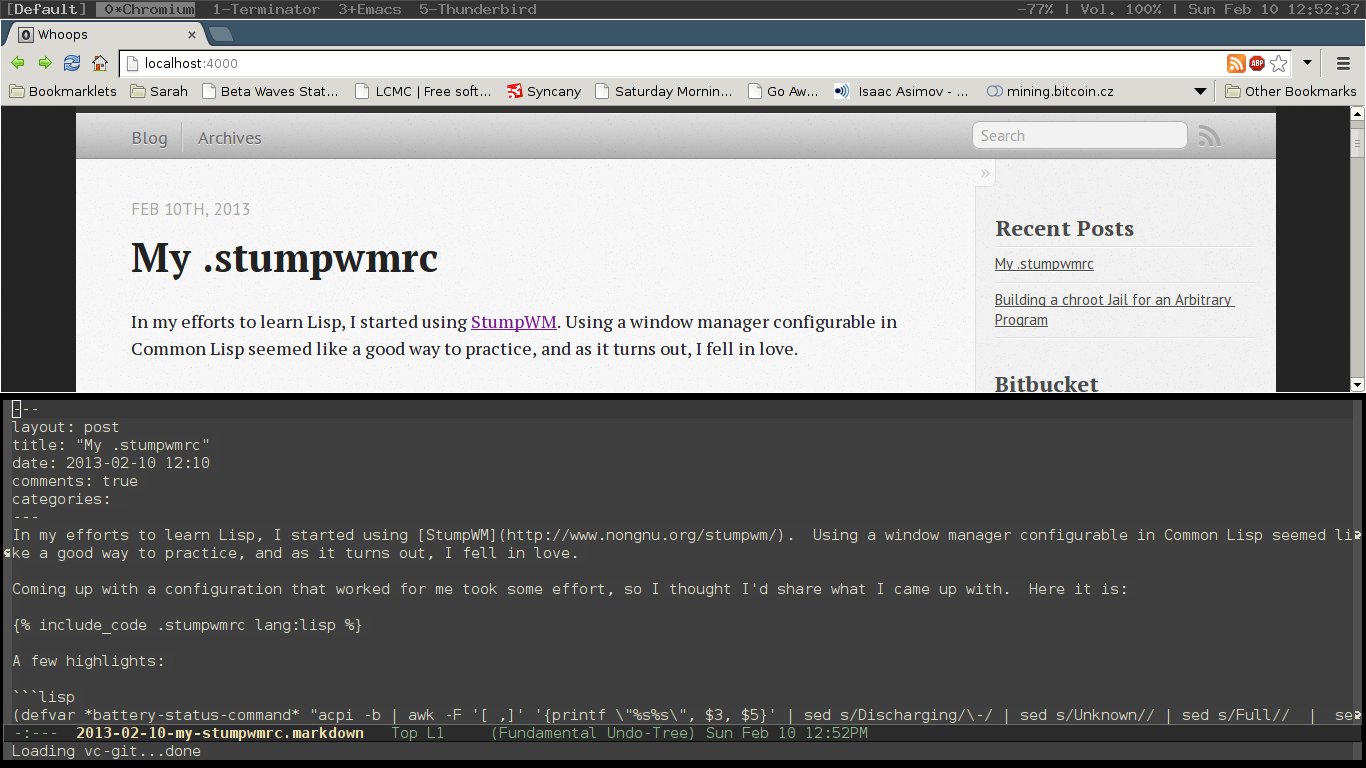
<p>The resulting layout:</p>
<div class="figure">
<img src="/images/stumpwm.jpg" alt="StumpWM Screenshot" />
<p class="caption">StumpWM Screenshot</p>
</div>
<p>A few highlights:</p>
<div class="sourceCode"><pre class="sourceCode commonlisp"><code class="sourceCode commonlisp">(<span class="kw">defvar</span><span class="fu"> *battery-status-command* </span><span class="st">&quot;acpi -b | awk -F &#39;[ ,]&#39; &#39;{printf </span>\&quot;<span class="st">%s%s</span>\&quot;<span class="st">, $3, $5}&#39; | sed s/Discharging/\-/ | sed s/Unknown// | sed s/Full//  |  sed s/Charging/+/&quot;</span>)
(<span class="kw">defvar</span><span class="fu"> *vol-status-command* </span><span class="st">&quot;amixer get Master | grep &#39;[[:digit:]]</span>\\<span class="st">+%&#39; -o | tr -d &#39;</span>\\<span class="st">n&#39;&quot;</span>)</code></pre></div>
<p>These are the commands that will be run to get the volume and battery levels, which I like to have in my top bar. Then:</p>
<div class="sourceCode"><pre class="sourceCode commonlisp"><code class="sourceCode commonlisp">(<span class="kw">setf</span> *screen-mode-line-format*
      (<span class="kw">list</span> <span class="st">&quot;[^B%n^b] %W^&gt;&quot;</span>
	    &#39;(:eval (run-shell-command *battery-status-command* <span class="kw">t</span>))
	    <span class="st">&quot; | Vol. &quot;</span>
	    &#39;(:eval (run-shell-command *vol-status-command* <span class="kw">t</span>))
	    <span class="st">&quot; | %d&quot;</span>))</code></pre></div>
<p>Sets the layout of the top bar the way I like it. Window list on the left, with the volume and battery status on the right, followed by the date.</p>
<p>Lastly a fun little shortcut:</p>
<div class="sourceCode"><pre class="sourceCode commonlisp"><code class="sourceCode commonlisp">(defcommand google (<span class="kw">search</span>) ((:string <span class="st">&quot;Google: &quot;</span>))
	    (<span class="kw">let</span> ((prefix <span class="st">&quot;chromium http://www.google.com/search?q=&quot;</span>)
		  (<span class="kw">search</span> (<span class="kw">substitute</span> <span class="ch">#\+</span> <span class="ch">#\S</span>pace <span class="kw">search</span>)))
	      (run-shell-command (<span class="kw">concatenate</span> &#39;string prefix <span class="kw">search</span>)))) 

(define-key *root-map* (kbd <span class="st">&quot;b&quot;</span>) <span class="st">&quot;google&quot;</span>)</code></pre></div>
<p>This snippet set it up so when I hit Ctrl-t, b, it prompts me for a term to Google, then opens a new Chromium tab with the results (just change <code>chromium</code> to the browser of your choice).</p>
<p>Hopefully this helps someone get started.</p>]]></summary>
</entry>
<entry>
    <title>Building a chroot Jail for an Arbitrary Program</title>
    <link href="https://waltonhoops.com/blog/2012/04/18/building-a-chroot-jail-for-an-arbitrary-program/" />
    <id>https://waltonhoops.com/blog/2012/04/18/building-a-chroot-jail-for-an-arbitrary-program/</id>
    <published>2012-04-18T00:00:00Z</published>
    <updated>2012-04-18T00:00:00Z</updated>
    <summary type="html"><![CDATA[<p>I recently had to build a <a href="http://linux.die.net/man/2/chroot">chroot</a> jail in order to run an executable I didn’t write in a secure enviorment. As this isn’t something there are many tutorials for, I thought it might be benificial to write one. Note that properly securing the jail is beyond the scope of this article and is better covered <a href="http://www.bpfh.net/simes/computing/chroot-break.html">elsewhere</a>. Instead this will cover how build a chroot environment with the dependencies your program needs to run.</p>
<p>So without further ado, let’s build a chroot environment. For this example we’ll secure <code>/bin/date</code>. So let’s create a chroot directory and copy the executable in.</p>
<div class="sourceCode"><pre class="sourceCode bash"><code class="sourceCode bash"><span class="fu">mkdir</span> ~/chroot
<span class="fu">mkdir</span> ~/chroot/bin
<span class="fu">cp</span> /bin/date ~/chroot/bin</code></pre></div>
<h2 id="step-1-finding-the-needed-shared-libraries.">Step 1: Finding the needed shared libraries.</h2>
<p>Well, that was easy enough, let’s go ahead and try to chroot. Note that only root can <code>chroot</code>, so you will need to use <code>sudo</code> or <code>su</code>, whichever is appropriate for your setup.</p>
<div class="sourceCode"><pre class="sourceCode bash"><code class="sourceCode bash">$ <span class="fu">sudo</span> chroot ~/chroot/ /bin/date
<span class="ex">chroot</span>: failed to run command ‘/bin/date’: No such file or directory</code></pre></div>
<p>This error might make you think that <code>/bin/date</code> is missing, but that’s not the case. What is actually happening is the system is unable to locate the shared libraries required. Lets figure out what those are.</p>
<div class="sourceCode"><pre class="sourceCode bash"><code class="sourceCode bash">$ <span class="fu">ldd</span> ~/chroot/bin/date
        <span class="ex">linux-vdso.so.1</span> =<span class="op">&gt;</span>  (0x00007fff074ca000)
        <span class="ex">librt.so.1</span> =<span class="op">&gt;</span> /lib/librt.so.1 (0x00007f6eaeb4c000)
        <span class="ex">libc.so.6</span> =<span class="op">&gt;</span> /lib/libc.so.6 (0x00007f6eae7ab000)
        <span class="ex">libpthread.so.0</span> =<span class="op">&gt;</span> /lib/libpthread.so.0 (0x00007f6eae58f000)
        <span class="ex">/lib/ld-linux-x86-64.so.2</span> (0x00007f6eaed54000)</code></pre></div>
<p>Ok, so what we have here is a list of the shared libraries <code>date</code> is using and their location on disk. So we can simply copy them into the proper place in our chroot.</p>
<div class="sourceCode"><pre class="sourceCode bash"><code class="sourceCode bash">$ <span class="fu">mkdir</span> ~/chroot/lib
$ <span class="fu">cp</span> /lib/librt.so.1 ~/chroot/lib/
$ <span class="fu">cp</span> /lib/libc.so.6 ~/chroot/lib/
$ <span class="fu">cp</span> /lib/libpthread.so.0 ~/chroot/lib/
$ <span class="fu">cp</span> /lib/ld-linux-x86-64.so.2 ~/chroot/lib/</code></pre></div>
<p>Notice <code>linux-vdso.so.1</code> does not have a file associated with it. That’s because this is a special shared library <a href="http://blogs.igalia.com/aperez/2009/01/the-story-of-linux-gatevdsoso/">provided by the kernel</a>.</p>
<p>Now try running inside your chroot jail again:</p>
<div class="sourceCode"><pre class="sourceCode bash"><code class="sourceCode bash">$ <span class="fu">sudo</span> chroot ~/chroot /bin/date
<span class="ex">Thu</span> Apr 19 02:51:12 UTC 2012</code></pre></div>
<p>Ok that looks pretty good, but compare that to running outside the chroot</p>
<div class="sourceCode"><pre class="sourceCode bash"><code class="sourceCode bash">$ <span class="ex">~/chroot/bin/date</span> 
<span class="ex">Wed</span> Apr 18 22:52:01 EDT 2012</code></pre></div>
<p>Notice that the timezone is wrong when run inside the chroot. Let’s see if we can figure out why in step 2:</p>
<h2 id="step-2-finding-needed-files">Step 2: Finding needed files</h2>
<p>There is no sure way to find all the files that your process is going to need, but most of the time you can take a pretty good guess as to most of them. For example if you’re chrooting Python, you probably need all those files from a standard Python install. For those that aren’t obvious, there is one tool that can help you. <code>strace</code> lets you capture all the system calls that a process is making. The -e option lets you watch for a specific call. So let’s try it on our <code>date</code> program.</p>
<div class="sourceCode"><pre class="sourceCode bash"><code class="sourceCode bash">$ <span class="ex">strace</span> -e open ~/chroot/bin/date 
<span class="ex">open</span>(<span class="st">&quot;/etc/ld.so.cache&quot;</span>, O_RDONLY<span class="kw">|</span><span class="ex">O_CLOEXEC</span>) = <span class="ex">3</span>
<span class="ex">open</span>(<span class="st">&quot;/lib/librt.so.1&quot;</span>, O_RDONLY<span class="kw">|</span><span class="ex">O_CLOEXEC</span>) = <span class="ex">3</span>
<span class="ex">open</span>(<span class="st">&quot;/lib/libc.so.6&quot;</span>, O_RDONLY<span class="kw">|</span><span class="ex">O_CLOEXEC</span>) = <span class="ex">3</span>
<span class="ex">open</span>(<span class="st">&quot;/lib/libpthread.so.0&quot;</span>, O_RDONLY<span class="kw">|</span><span class="ex">O_CLOEXEC</span>) = <span class="ex">3</span>
<span class="ex">open</span>(<span class="st">&quot;/usr/lib/locale/locale-archive&quot;</span>, O_RDONLY<span class="kw">|</span><span class="ex">O_CLOEXEC</span>) = <span class="ex">3</span>
<span class="ex">open</span>(<span class="st">&quot;/etc/localtime&quot;</span>, O_RDONLY<span class="kw">|</span><span class="ex">O_CLOEXEC</span>) = <span class="ex">3</span></code></pre></div>
<p>Ok, so the first few are attempting to dynamically load some libraries, which may sometimes be important for your process, but in this case we can get away without them. The last one however is important. So let’s add <code>/etc/localtime</code> to our chroot directory.</p>
<div class="sourceCode"><pre class="sourceCode bash"><code class="sourceCode bash">$ <span class="fu">mkdir</span> ~/chroot/etc
$ <span class="fu">cp</span> /etc/localtime ~/chroot/etc/
$ <span class="fu">sudo</span> chroot ~/chroot /bin/date 
<span class="ex">Wed</span> Apr 18 23:00:47 EDT 2012</code></pre></div>
<p>Bingo! Correct time and timezone. Hopefully this will help anyone having trouble getting programs to run inside a chroot jail. If you have any questions or comments, feel free to reach out to me on <a href="https://twitter.com/#!/Volunder">Twitter</a> or <a href="https://github.com/Whoops">GitHub</a>.</p>]]></summary>
</entry>

</feed>